Take My Posts To Your Email Inbox

Enter your email address & be one among the 600+ subcribers.

Thanks for visiting my blog ;-)

Showing posts with label Windows OS/Tips. Show all posts

Thursday, September 16, 2010

Highlights of IE9 Beta - Microsoft's Latest Web Browser !!!

       I am currently experiencing the highlights of the Microsoft's latest web browser, Internet Explorer 9 Beta....


I have blogged here some of the screenshots of those highlights. Go here to experience about the IE9 browser.

Shot1:

In IE9, the address bar and search text box are binded together,.. When you hit ENTER with a url in that box, then you will be taken to that particular website. And when you hit ENTER with a phrase or word, then you are taken to the Bing, searching that particular phrase....


Shot2:
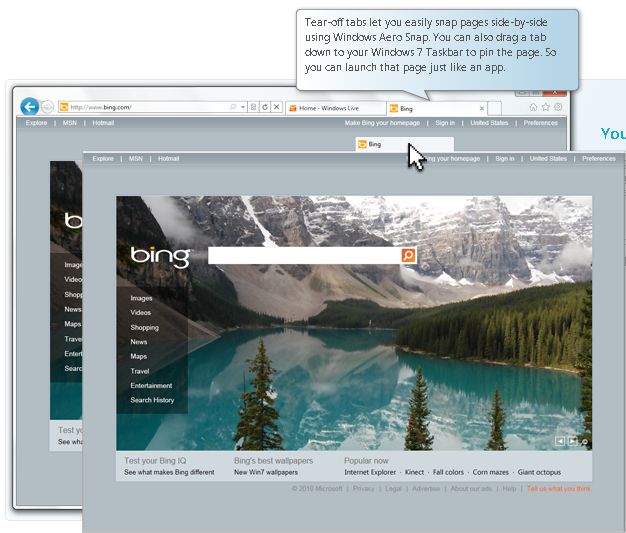
Another cool thing with this IE9 is, you can pin a tab to your Windows 7 taskbar, as you pin other desktop application. That is you can bookmark a website in your Windows 7 taskbar. Go here for a DEMO.

Shot3:

       You are disturbed while browsing only in rarecases. That is, when you download a file, the notification asking for a confirmation is at the bottom of your browser. And also notifications asking for your confirmation to save your password is also at the bottom of your browser.

Shot4:

You will notice from the above clips that your favorites and tools and preferences section are much better organized in the Microsoft's latest browser IE9....

Shot5:
The below are the screenshots showing how to pin a tab in the Windows 7 task bar.


Go here to download the IE9 Beta..........

Sunday, September 5, 2010

Interesting & Secret Facts About Windows 8 !!!

        The Windows 8 release date has been shrouded in a cloud of rumors. Most experts expect a late 2011 early 2012 release of the operating system. A recently leaked Windows 8 product cycle chart provides the answers needed to determine the release date of the next Windows OS by Microsoft.

          Click here to get a enlarged view of the image. The chart lists the planning, development and readiness product cycle of Windows 8 and related Microsoft products such as Internet Explorer 8, Windows Live Wave 4, Windows Live Wave 5 and Windows 7. It also lists major events.
Some events and products have already been held / released and it is possible to pinpoint the release date of Windows 8 by making the remaining calculations.

           Here is what we know. Forum I and Forum II have been major events, the former held in December 2009, the latter in April 2010. The listing lists four additional event, Forum III to Forum VI. The next two events fall into the development phase of Windows 8, the remaining two into the readiness phase.
Internet Explorer 9 and Windows Live Wave 4 have either been announced with final dates (at least for the beta) or released already.

           Forum II was held 4-5 months after Forum I. If we take this approach we can calculate the approximate month of the other four forums. This would mean between 16 to 20 months from April 2010 on which coincides perfectly with the projected late 2011 release date.

           The Windows 8 beta should be released around June 2011 and the final release might even hit the stores at the same time that Windows 7 was released, which was October. The Internet Explorer 9 product cycle confirms the findings. Microsoft has announced a beta release of Internet Explorer 9 for August 2010. This would be the same time that Forum III will be held, which is exactly four months after Forum II.
        
           The chart may be a bit off since Windows Live Wave 4 was released in June. It could be that Microsoft has projected the Forum III conference for June / July instead. Could also be that the chart is not 100% accurate and it can happen that development cycles need to be shifted, especially if major issues are encountered during development. Still, we are pretty sure that Microsoft will release the beta of Windows 8 in or around June 2011 and the final release of the operating system in or around October 2011.

Sunday, August 29, 2010

Paul Allen Sues Google, Facebook, Apple, YouTube, ...

A firm owned by billionaire Microsoft co-founder Paul Allen sued Apple, Facebook, Google, YouTube, and seven other companies, charging them with infringing patents filed more than a decade ago.
Google and Facebook blasted the lawsuit as "unfortunate" and "without merit."
The complaint, filed Friday morning in a Seattle federal court, named AOL, Apple, eBay, Facebook, Google, Netflix, Office Depot, OfficeMax, Staples, Yahoo and Google's YouTube.
AOL, Apple, Google and Yahoo were each charged with four claims of patent infringement, while Facebook was hit with one. The other eight companies were charged with two claims each.
The suit does not name Microsoft, which Allen co-founded with Bill Gates in 1975 but left in 1983 after being diagnosed with Hodgkin's disease. Microsoft did not reply to a request asking whether it had licensed some or all of the applicable patents from Allen's firm.
Allen's lawsuit claimed that the 11 companies violated patents developed by Internal Research, a Silicon Valley research lab he funded in 1992, but which shut its doors in 2000. David Liddle, who worked at the Xerox's influential Palo Alto Research Center ( Xerox PARC) in the 1970s, was Interval's CEO.
Those patents were later transferred to Interval Licensing, a company owned by Allen.
The two patents that make up the bulk of the claims are 6,263,507, "Browserfor Use in Navigating a Body of Information, With Particular Application to Browsing Information Represented By Audiovisual Data," and 6,757,682, "Alerting Users to Items of Current Interest." Allen's lawsuit alleges that all but Facebook violated the '507 patent, and all 11 companies infringed the '682 patent.
Interval filed applications for the four patents between March 1996 and September 2000, and was awarded the patents between March 2000 and September 2004.
The '507 patent refers to a possible application in a "news browser" that could be used to "review news stories acquired during one day from several television news programs, as well as from text news sources." The '682 patent, meanwhile, describes technology for alerting users of Web content related to what they're currently viewing, or of others' activities that might interest them.
The '682 patent is the only one that Allen's company claimed was violated by Facebook, the popular social networking site.
The remaining two patents spell out an "attention manager" that would flash advertisements, stock quotes and other information in front of a user.
The 15-page complaint singled out Google for special treatment, saying that Interval Research provided both funding and assistance to the then-fledgling search firm in 1998, the year founders Larry Page and Sergey Brin incorporated the company.
Included with the complaint was a 1998 screenshot of Google's "About" page that showed Interval Research credited as one of four sources of research funding, and one of two outside collaborators.
In a statement Friday, Google called Allen's lawsuit "unfortunate."
"This lawsuit against some of America's most innovative companies reflects an unfortunate trend of people trying to compete in the courtroom instead of the marketplace," said Google. "Innovation -- not litigation -- is the way to bring to market the kinds of products and services that benefit millions of people around the world."
Facebook's take was more blunt. "We believe this suit is completely without merit and we will fight it vigorously," said company spokesman Andrew Noyes in an e-mail.
Other Firms contacted by Computerworld, including Apple and Yahoo, did not immediately reply to requests for comment on the lawsuit.
Allen's suit seeks unspecified damages, as well as injunctions that would block the accused companies from continuing to use the patented technologies.
Earlier this year Forbes put Allen, 57, in the No. 37 spot on its world's richest list, and estimated his net worth at $13.5 billion.

How To Prevent 'Unsigned, Unauthorized' Softwares From Getting Installed In Your Computer !!!

Windows 7's awesome feature, AppLocker, can help prevent kids from installing bloatware and untrusted software on PCs and laptops. 


AppLocker lets users install only those programmes that they specify it to run. Here's how:

1. Create a rule to allow everything from a publisher — for eg. Microsoft

2. This will let you run all signed Yahoo apps

3. Launch RUN and type GPEDIT.MSC and press ENTER key go to Computer Configuration

4. Go to Windows SettingsSecurity SettingsApplication Control Policies & AppLocker. You'll have an idea of what all apps are running on your PC.

Is Your Computer Protected !!!

Computer Virus, Malware Program Information & Threat Types

Tuesday, July 20, 2010

How to rename a bulk of files in a single return key

        If you are the trigger-happy kind on your vacation and can’t live without posting them on Facebook or Flickr, then renaming all those files can be a serious pain. Cameras cannot do it for you. Here’s a quick hack which can rename all your files in one go.

       Open the folder in which your to-be renamed files are. Select the files you want to rename. If the files are not adjacent, hold down CTRL and click on the files you want to rename. Click on 'File' in the menu bar and then 'Rename' option and then type the new name and hit Enter.

How To Backup Windows Registry !!!

            Some of us like playing with our operating system such as changing the text that appears on the Windows start button (your own name instead of Start) etc ... It is your own interest in doing those things.... But one thing, what will you do when you lost all your important system files, and registry settings, which might lead to complete reformat of your OS, when you mess up with your OS ? ... So be careful when doing such things.. A good tip for saving such accidents is taking a back up of your Windows Registry.....If you are going to tweak around your system, you better back up your Windows registry. In case an error or hack goes wrong, you can always restore your registry to its original position. Here’s how.

  •     Click on Start--> Run and type Regedit and hit Enter. 
  •       Now choose My Computer from the left folder pane
  •       Now click on File--> Export and give it a file name
  •       Select a location to store it, ideally on a CD or a pen drive.This will take some time but will pay in the long run.

Saturday, July 3, 2010

Microsoft.Net Forum

          Welcome to the web forum on Microsoft.Net. This forum will be a tool for the .Net aspirants, who are willing to master the .Net. Microsoft.Net is a free forum created in the forumotion and will be maintained by me. The URL to the Forum is http://dotnetforum.vivekanandan.in . The young aspirants can join here and learn .Net and off course experienced .Net wizards can join here and share their .Net knowledge.

Thursday, July 1, 2010

Microsoft.Net is Platform Independent !!!!!!

Some hate the most beatuiful and the sexiest technology on earth, Microsoft.Net. They say that Microsoft.Net is not platform independent as other technologies such as Java. Pity on them. Becoz, they don't know that .Net Frameworks are available for Linux based operating systems also. Stunned !!!!!!!
Ya, Apps that are developed in .Net technology  (either Windows or Web Application) can be runned on Linux OS or Unix/X11 based OS.... Just download the .Net Framework for various linux OS here http://Mono-Project.com ... Various .Net Frameworks are available for different Linux based OS and Unix/X11 based OS, ...... Frameworks for Red Hat, Ubuntu, Open Suse, Solaris, and even Mac OS .... Experience the .Net apps in  Linux Operating systems..... It is possible to develop a .Net application for iPhone or iPod touch. Microsoft.Net is a gem. It is platform independent.

Friday, June 18, 2010

Customizing Windows 7 Desktop

Welcome to Vivsoft Tutorials... This is my first video tutorial.... And this tutorial is about Customizing the Windows 7 Desktop... Changing the themes for Windows 7 and downloading the beautiful and classic themes from Microsoft's Official Website..
And view this video in my website also...

Thursday, June 17, 2010

Windows 7 Support !!!

Are you Windows 7 lover.... Do you have any mishaps with your operating system... Are you want to configure your operating system to your style. Or you want you computer's desktop to shine as you wanted.

Just visit the website below, you will get a lot of help from the official windows 7 support centre....
http://bit.ly/2x3xIY

Sunday, May 30, 2010

Microsoft bets on new browser to regain edge - IE9

Internet Explorer 9 will have more open approach, says company, Microsoft Corporation 

for more details ... 

http://bit.ly/9nsw4I  


Change the Windows 7 Settings...

Change the Windows 7 Settings...

For related videos, PDFs and XPSs click the link below

http://bit.ly/aXfBDP

Windows 7 Aero Shortcuts

Find more details in my website ... follow the link below ...
http://bit.ly/dsMZ2l 

Gov 2.0: NASA, Microsoft Ready Mars 3D Views

A partnership between NASA and Microsoft to bring high-resolution images of Mars to Microsoft's World-wide Telescope is almost ready for public viewing. 
http://bit.ly/b9GOP2  


How to back up your entertainment to disc

To make sure you don't lose the files that you create, modify, and store on your computer, you should back them up regularly. You can manually back up your files any time or set up automatic backups.
 
Note The ability to set up automatic backups is not included in Windows Vista Starter and Windows Vista Home Basic.
For further details click the link below .... http://bit.ly/d8q4uA


Saturday, May 29, 2010

Classic Classroom presentations with MS Powerpoint

Matt has a recurring dream about avoiding embarrassment in classroom presentations. And beyond. Windows 7 makes the dream come true. But every dream has its tighty-whitey lining.

Click Here to Take the video directly

Wednesday, May 26, 2010

Any Stereo Headset can now be converted into 7.1 Dolby Surround System

Cool one to hear from Windows Experience Blog... Any Stereo type headset can now be converted into 7.1 Dolby surround system.....
For Further details contact
Vivsoft Resource Centre : Recent Trends & Updates
http://vivekanandan.in

Drag This To Your Browser's Bookmarks